
Local development with an event store usually means juggling Docker commands, remembering port numbers, and clicking through browser certificate warnings. The new GenesisDB Orchestrator removes all of that. It is a small cross-platform CLI that runs isolated GenesisDB Docker containers behind one local HTTPS proxy, so every instance is reachable at https://<name>.genesisdb.local with a certificate your system actually trusts.
Install it in one line
The installer detects your operating system and architecture, verifies the release checksum, and puts the binary on your PATH:
curl -fsSL https://orchestrator.genesisdb.io/install.sh | bash
Release archives for macOS, Linux, and Windows on AMD64 and ARM64 are also available on the latest GitHub release.
One init, then create as many databases as you need
A single genesisdb init sets up the local proxy, creates a wildcard certificate, trusts its local CA, and adds genesisdb.local to your hosts file. After that, spinning up a fresh instance is one command:
genesisdb create
Or simply run genesisdb without arguments to open the interactive terminal dashboard and create your database from there. Either way, the wizard asks for a name, an auth token, and an optional license key. Press Enter to use the free license. Every instance gets:
- Its own local domain: Available via HTTPS on port 443 and HTTP on port 80, no port juggling.
- Full isolation: Each database runs in its own container inside a private Docker network.
- Persistent data: Events are stored in a named Docker volume that survives restarts and shutdowns.
A dashboard in your terminal
Run genesisdb without arguments and you get an interactive terminal dashboard. It initializes the proxy, starts your existing databases, and lists everything that is running or stopped. From there, single keystrokes cover the whole lifecycle:
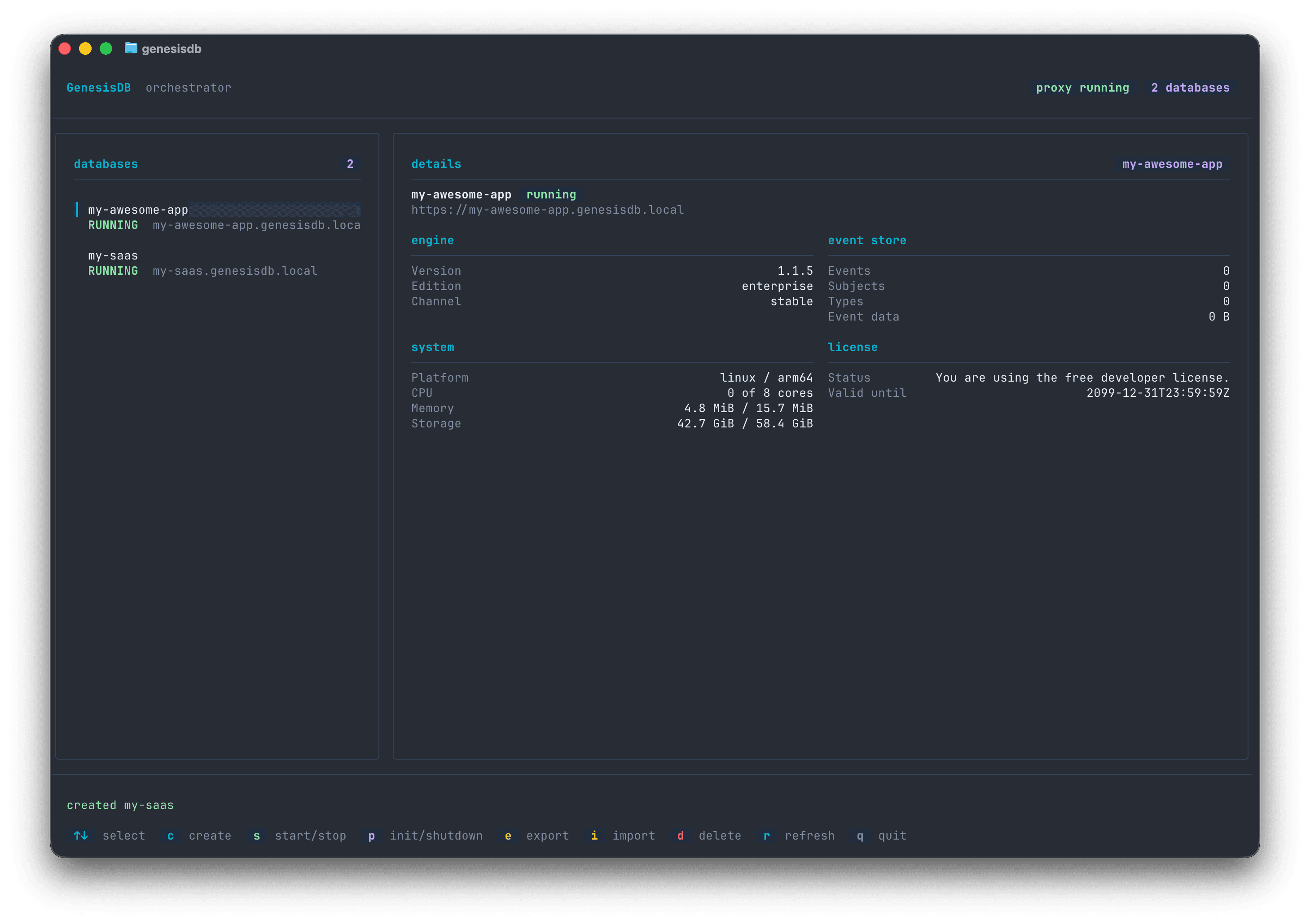
Lifecycle at a Keystroke
Create, start, stop, and delete databases without leaving the dashboard. One key shuts down every instance and the proxy, another brings everything back up.
Backups Built In
Export a JSON backup of any instance or restore one into an empty event store, powered by the standard GenesisDB backup API.
Live Status
The details panel shows engine, event store, system, storage, memory, CPU, and license information for the selected instance, refreshed automatically.
Self-Updating
The CLI checks GitHub for new releases, verifies checksums, and updates itself with genesisdb update. Network failures never block your normal commands.
Plays well with your tools
Point the GenesisDB VS Code extension at http://<name>.genesisdb.local and browse your local event streams directly from the editor. The HTTP endpoint exists precisely for tools whose embedded runtimes do not read the operating system trust store, so everything just works.
From zero to a running local event store in two commands
Install the CLI, run genesisdb init, and create your first database. No manual Docker networking, no self-signed certificate warnings, no hosts-file editing by hand.
Try it today
The GenesisDB Orchestrator is open source under the MIT license. If you develop against GenesisDB locally, this is the fastest way to get clean, isolated instances that behave like the real thing.